Friday, September 15, 2006

Closing Windows

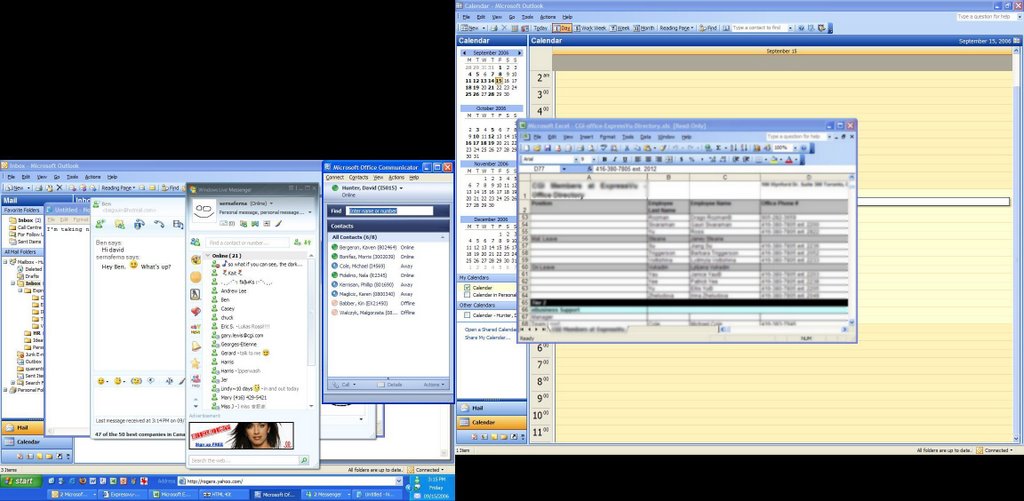
Like most computer users, I often have a bunch of windows open all at once. For example, if I’m in a meeting, I might turn my screensaver off, and have all of these open, to be able to easily look up any information I need during the call:


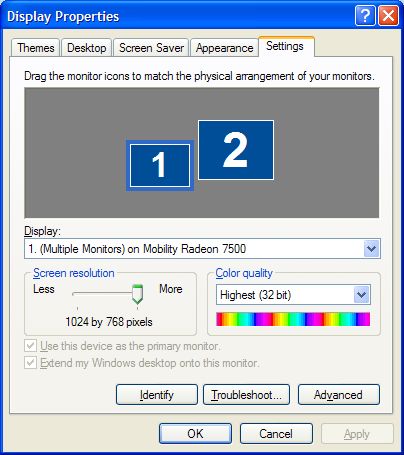
(As you can see, the screenshot looks a little bit odd, because I have multiple monitors, both with different resolutions, and one is set to be a bit higher than the other.)


Or, if I’m working on a blog entry, I might have HTML-Kit open on one screen, and Firefox on the other, like this:


Aside from the multiple monitor thing, this probably looks pretty normal to most people. We all have to multitask, these days, and it’s normal to have a bunch of things running all at once.

Unfortunately, I’ve developed the nasty habit of closing programs as soon as I think I’m done with them. For example, a scenario like this would be a normal sequence of events for me:

  1. I need to call a colleague, to tell him some piece of information. So I open up a Visio document I have, that includes the information, to refresh my memory. I read what I have to read, and then close Visio.
  2. I open an Excel spreadsheet that has a phone list for my office, to look up his extension, and call him. As I’m dialling the phone, I close Excel.
  3. He’s not there, so I decide to call back in a couple of minutes. At which point I re-open the Excel spreadsheet, and look up his number again (and close it again as I’m dialling).
  4. This time he is there. But he also needs another piece of information, so I need to re-open the Visio document, and read the information off to him. While I’m talking to him, he asks me for so-and-so’s extension, meaning I have to re-open the Excel spreadsheet.
The problem is that I’ll keep doing this. The situation above didn’t happen, but it’s realistic. I do indeed have a Visio document, with some useful information in it, and I must open it up 20 times every single day, because I keep needing to look things up, and then foolishly closing it right after. I waste a lot of time every day, opening and closing and re-opening and re-closing documents.

And it’s not like it’s even necessary. It’s not like I have a crappy laptop, that can’t keep more than 5 things open at once; I have a pretty good machine, and it’s rarely over-taxed. With the types of programs in the screenshots above, I don’t even get close to running out of memory or other resources. It’s just a habit I’ve developed.

Actually, it’s more psychological than anything. I get a feeling of satisfaction, when I close a program. It’s like I can feel the computer reclaiming resources—even though, as I said, the computer never comes close to running out of resources in the first place. It probably goes back to some of my first computers, when I was in college. Back then, it really was useful to close programs as soon as I was done with them, because the computers just couldn’t handle the load if I opened too many things at once.

I decided this afternoon to try and train myself out of this habit. I was going to assign a sound, in Windows, to the Close Program event, so that every time I closed a program, I would hear it. In fact, my plan was to assign a very annoying sound, and try and use negative reinforcement—eventually, the sound would annoy me so much that I would start closing programs less.

Unfortunately, the Close Program event in Windows is a bit more finicky than I would like—Windows apparently has a very loose definition of a “program”, in that context. For example, if I walk away from the computer, and the screensaver comes on, and then come back and deactivate it, well, Windows considers that closing a program, and plays the noise. Or if I go to my Display settings, and change the screensaver, as I change it, Windows plays the noise. There were some other examples that I can’t remember, where Windows played the sound when I didn’t expect it, and the net result is that I wouldn’t have trained myself out of anything, but I would have annoyed all of my colleagues within listening distance.

I guess I just need to be more aware of my actions, that’s all…

Xgl Demo

I was sent this demo, on YouTube, of Xgl in action. Xgl is a graphics/windowing subsystem, used by Linux. Or rather, according to Wikipedia, Xgl is “an X server architecture designed to take advantage of modern graphics cards via their OpenGL drivers, layered on top of OpenGL via glitz. It supports hardware acceleration of all X, OpenGL and XVideo applications and graphical effects by a compositing window manager such as Compiz.”

It’s running on some flavour of Linux—I don’t know if it’s Ubuntu, or Kubuntu, or something else entirely, because I don’t know enough about the different flavours of Linux. Anyway, here’s the demo. Enjoy!


I’ve seen other Xgl demos—all on YouTube—but this is probably the best quality one.

Geek Post: Continuous Integration

I read an article today on Continuous Integration, by Martin Fowler. If you’re in the computer field, you’ve probably come across articles by Mr. Fowler before; he’s a very bright man, and has written many good computer-related articles.

The basic tenet of Continuous Integration is that all of the code for a particular system is integrated on a regular basis, rather than being done all at the end. This will help developers find integration-related bugs much quicker, and finding bugs quicker usually makes them easier to solve.

If a clash occurs between two developers, it is usually caught when the second developer to commit [to source control] builds their updated working copy. If not the integration build should fail. Either way the error is detected rapidly. At this point the most important task is to fix it, and get the build working properly again. In a Continuous Integration environment you should never have a failed integration build stay failed for long. A good team should have many correct builds a day. Bad builds do occur from time to time, but should be quickly fixed.

The result of doing this is that there is a stable piece of software that works properly and contains few bugs. Everybody develops off that shared stable base and never gets so far away from that base that it takes very long to integrate back with it. Less time is spent trying to find bugs because they show up quickly.

This quote, from the beginning of the article, illustrates why this is important:

I vividly remember one of my first sightings of a large software project. I was taking a summer internship at a large English electronics company. My manager, part of the QA group, gave me a tour of a site and we entered a huge depressing warehouse stacked full with cubes. I was told that this project had been in development for a couple of years and was currently integrating, and had been integrating for several months. My guide told me that nobody really knew how long it would take to finish integrating. From this I learned a common story of software projects: integration is a long and unpredictable process.

But this needn’t be the way. Most projects done by my colleagues at ThoughtWorks, and by many others around the world, treat integration as a non-event. Any individual developer’s work is only a few hours away from a shared project state and can integrated back into that state in minutes. Any integration errors are found rapidly and can be fixed rapidly.

This contrast isn’t the result of an expensive and complex tool. The essence of it lies in the simple practice of everyone on the team integrating frequently, usually daily, against a controlled source code repository.

When I’ve described this practice to people, I commonly find two reactions: “it can’t work (here)” and “doing it won’t make much difference”. When people find that it’s much easier than it sounds, and see that it makes a huge difference to development. Thus the third common reaction is “yes we do that—how could you live without it?”

…

Although Continuous Integration is a practice that requires no particular tooling to deploy, we’ve found that it is useful to use a Continuous Integration server. The best known such server is CruiseControl, an open source tool originally built by several people at ThoughtWorks and now maintained by a wide community. The original CruiseControl is written in Java but is also available for the Microsoft platform as CruiseControl.net.

Here are the key practices of Continuous Integration, from Mr. Fowler’s article:
  • Maintain a single source repository. It’s pretty common wisdom that any development team should have some type of source control system, where all code is maintained.
    The rule of thumb is that anything you need to build the system should be in the repository, and anything that is built should not. If you’re a J2EE developer, using some framework, and need the JAR files from that framework for your code, then put them in the source control. But when you’ve finished compiling your EAR file, don’t put the EAR file into source control. (There are exceptions to this rule, but not as many as people would think.) If someone needs the EAR file, for whatever reason, they can get the source files from the source control system, and build it.
  • Automate the build. The build process should use an automated “build script”—in whatever technology makes sense for your project—that makes building the application a one-step process. Because of the self-testing nature of Continuous Integration (see next bullet), this should even go as far as putting the database schema into a valid state.
    In the Java world, Ant is the tool of choice for creating these automated builds, and Mr. Fowler indicates that it can even be used in the Microsoft world. Although many—if not most, if not all—IDEs include functionality for performing the build process, it’s better to have an external build process, which can be run outside of the IDE. It’s fine for developers to use their IDE for building on their local machines, but the central build for the project should never rely on the IDE. (In the Java world, the IDE builds are often done in conjunction with the project’s Ant script—which, by the way, should also be checked into source control!) Another quote from the article, to sum up this point:

    A common mistake is not to include everything in the automated build. The build should include getting the database schema out of the repository and firing it up in the execution environment. I’ll elaborate my earlier rule of thumb: anyone should be able to bring in a virgin machine, check the sources out of the repository, issue a single command, and have a running system on their machine.

  • Make the build self-testing. As much as possible, the build process should include automated testing scripts, which test different aspects of the system during the build. Failures in the test cases should cause the build to fail. The XUnit family of tools (JUnit for Java, CppUnit for C++, etc.) is an excellent place to look, if you’re new to this concept.
    The basic idea is that any time you write a new object or method, you should also have a unit of code, to be executed as part of the build, which tests that object/method. These automated test cases go a long way toward catching bugs quickly, before a human begins running test cases. They are especially useful for regression testing. It’s quite true that these automated tests won’t catch all—maybe not even most—of the bugs in a system. But as Mr. Fowler says: “Testing isn’t perfect, of course, but it can catch a lot of bugs—enough to be useful.” He also says, later on:

    Of course you can’t count on tests to find everything. As it’s often been said: tests don’t prove the absence of bugs. However perfection isn’t the only point at which you get payback for a self-testing build. Imperfect tests, run frequently, are much better than perfect tests that are never written at all.

  • Code should be checked in regularly. (The article actually states this as “Everyone Commits Every Day”.) One of the key aspects of Continuous Integration is that the code is constantly being checked, by the build process. If you have your build automated, and you have a suite of automated tests that are run as part of the build process, bugs which are introduced with any piece of code can be found (and fixed) quickly. If the build process runs every two hours, and a build fails because of a bug, then there is two hours’ worth of code to check. If the process runs daily, then there is a day’s worth of code to test; if it runs every week, then a week’s worth of code.
  • Every commit should kick off the build process, on the build machine. (Of course, this also pre-supposes a “build machine”, which is something else the project should have!) Any time code is checked back into the source control system, this should kick off the build process, so that integration bugs can be detected. This can either be manual—meaning that the developer checks in the code, and then walks over to the build machine and kicks off the process—or automated. With an automated tool, such as CruiseControl, the tool monitors the source control system, and any time code is checked in, it kicks off the build process, usually followed by an email to the appropriate parties, to indicate the success/failure of the build.
  • Keep the build fast. Because Continuous Integration requires every check-in of code to trigger a build process, it’s important to keep the build as quick as possible. If the build process takes an hour, then every time a developer checks in code, it results in an hour of wasted time, waiting for the build to finish. The main thing Mr. Fowler suggests, along this line, is to have the build done in stages. The build script should be smart enough to only build what needs building, and, if possible, only test what needs testing. (It’s often the automated test cases which take up the most amount of time.)
  • Test in a clone of production. As much as possible, make your test environment like the production environment. (Same operating system, same libraries, same hardware (if possible), same network configuration, same numbers of servers in the cluster, etc.) The results of this are obvious—environment-related problems will be discovered before you go to production—but it’s not always possible to get exact copies of environments to test with. Do what you can (within your budget).
  • Make it easy to get the latest version of the code. There should always be a copy of the latest version of the application, which is available for demonstrations, walkthroughs with the users, etc. In my opinion, this may or may not be practical; for web-based applications, which are what I’ve been mostly doing for the last number of years, it might mean occasionally giving people access to the development environment, to see what the system looks like.
  • Everyone can see what’s happening. He recommends that at the end of the build process, there is as much information as possible to indicate the state of the build—red or green lights on the build machine’s screen, to indicate success or failure, auditory noises to indicate success or failure, etc. I’m not really sold that this is a necessary thing, but I’m sure it’s useful.
  • Automate deployment. Finally, an automated build isn’t much good unless it can also deploy automatically. Fowler recommends that the deployment to production should also be done using the automated tools; that way, the same method of deployment is used everywhere, and mistakes are reduced. And, of course, if you are going to automate the build, then rollbacks should be automated, in case there are problems.
Overall, the main benefit of Continuous Integration is the reduced risk. Bugs are often found quicker, making it easier to fix them. Problems with integration—Developer A’s code works fine, but not when Developer B checks in his/her code—can be found right away, and, again, fixed quickly.

Continuous Integrations doesn’t get rid of bugs, but it does make them dramatically easier to find and remove. In this respect it’s rather like self-testing code. If you introduce a bug and detect it quickly it’s far easier to get rid of. Since you’ve only changed a small bit of the system, you don’t have far to look. Since that bit of the system is the bit you just worked, it’s fresh in your memory—again making it easier to find the bug. You can also use diff debugging—comparing the current version of the system to an earlier one that didn’t have the bug.

A lot of development teams shy away from the idea of Continuous Integration, because they feel it will steal valuable time away from their development. But, in the long run, I’ve found the opposite to be true: the amount of time saved, over all, on the integration side of things, more than offsets any incremental time spent on creating test scripts, and running the build on a regular basis. If a developer checks in his/her code, and then has to spend 10 minutes to fix a bug, that was caught by the automated test cases in the build script, that’s 10 minutes well spent—and could have been hours or days, at the end of a project, trying to track down and fix the same bug.

Thursday, September 14, 2006

Nacho Dip

Near my parents’ place, there is a Sobeys that sells some kind of nacho chip dip. Once, when I was visiting and staying at their place for a few days, they bought some, and I absolutely loved it. Normally, however, when I go home, I’m only staying for a short while, so I haven’t had the opportunity to buy it again.

I’ve checked other Sobeys stores—there are a couple within driving distance of my place, and we’re sometimes forced to go when we need to get something after hours—and none of them carry it. And, since my parents live three hours away, it was never really feasible for me to buy it and bring it back with me; I doubt it would last a three hour car ride.

But I went home on the weekend, for my god-daughter’s baptism, and I had a brilliant idea: Why not buy one of those little mini coolers, and one of those blue freezer things, and bring it home in that? It’s pretty much exactly the right size, and should surely last three hours! I’m frigging brilliant.

Unfortunately, I knew what was coming next, and it did: after all that, the dip isn’t as good as I remember it. Maybe I got a bad batch or something, but it’s just not what I was hoping for, nor what I remembered it to be.

Oh well. At least some good came out of it: Andrea can use the mini cooler to bring her lunches to work.

Wednesday, September 13, 2006

Wikis

I’ve been thinking a lot about wikis lately. (I love the irony—or appropriateness, depending on your point of view—of linking to Wikipedia for the definition of “wiki”.)

If you’re not familiar with the concept, a wiki is essentially an “open source encyclopedia”. Articles can be written, and edited, by anyone. Some would argue that “encyclopedia” is too specific of a term, but I’m using it in a loose sense; a wiki can be “about” anything. I’ve been thinking about wikis because they can be very useful within an organization / corporation / whatever for internal documentation; instead of setting up an intranet site, or a SharePoint site with lots of Word and PowerPoint docs, or a “knowledge base” or source control system with lots of documents, the organization can set up a wiki instead. In time, as people edit articles and create new ones, the knowledge which is captured becomes more and more complete.

And, of course, you just can’t have a discussion about wikis these days without mentioning Wikipedia. Many of my posts to this blog contain links to the English version of Wikipedia, for definitions or discussions of various topics.

I’m fascinated by Wikipedia, and, at the same time, have all of the same reservations that everyone else has about a “collaborative encyclopedia”. Namely: Who’s to say that the information I read on Wikipedia is accurate? Or, put another way: Who’s to say the person who wrote an article in Wikipedia really knows what s/he is talking about? I was reading an article on HowStuffWorks.com about wikis, and it provided a link to an article by the CEO of Britannica, Robert McHenry, called The Faith-Based Encyclopedia, which made this point very clearly. (Wikipedia lovers will immediately point out the bias of an article being written by the CEO of a “traditional” encyclopedia, criticizing a wiki-based encyclopedia.)

Here is a [rather long] quote, discussing the Wikipedia article for Alexander Hamilton:

I know as well as anyone and better than most what is involved in assessing an encyclopedia. I know, to begin with, that it can’t be done in any thoroughgoing way. The job is just too big. Professional reviewers content themselves with some statistics—so many articles, so many of those newly added, so many index entries, so many pictures, and so forth—and a quick look at a short list of representative topics. Journalists are less stringent. To see what Wikipedia is like I chose a single article, the biography of Alexander Hamilton. I chose that topic because I happen to know that there is a problem with his birth date, and how a reference work deals with that problem tells me something about its standards. The problem is this: While the day and month of Hamilton’s birth are known, there is some uncertainty as to the year, whether it be 1755 or 1757. Hamilton himself used, and most contemporary biographers prefer, the latter year; a reference work ought at least to note the issue.

The Wikipedia article on Hamilton (as of November 4, 2004) uses the 1755 date without comment. Unfortunately, a couple of references within the body of the article that mention his age in certain years are clearly derived from a source that used the 1757 date, creating an internal inconsistency that the reader has no means to resolve. Two different years are cited for the end of his service as secretary of the Treasury; without resorting to another reference work, you can guess that at least one of them is wrong. The article is rife with typographic errors, styling errors, and errors of grammar and diction. No doubt there are other factual errors as well, but I hardly needed to fact-check the piece to form my opinion. The writing is often awkward, and many sentences that are apparently meant to summarize some aspect of Hamilton’s life or work betray the writer’s lack of understanding of the subject matter. A representative one runs thus:

“Arguably, he set the path for American economic and military greatness, though the benefits might be argued.”

All these arguments aside, the article is what might be expected of a high school student, and at that it would be a C paper at best. Yet this article has been “edited” over 150 times. Some of those edits consisted of vandalism, and others were cleanups afterward. But how many Wikipedian editors have read that article and not noticed what I saw on a cursory scan? How long does it take for an article to evolve into a “polished, presentable masterpiece,” or even just into a usable workaday encyclopedia article?

The history page for this article reveals a most interesting story. Originally, the 1757 birth date was used. Thus the internal inconsistencies of ages and dates that I saw are artifacts of editing. Originally, the two citations of the year Hamilton resigned from the Cabinet agreed; editing has changed one but not the other. In fact, the earlier versions of the article are better written overall, with fewer murky passages and sophomoric summaries. Contrary to the faith, the article has, in fact, been edited into mediocrity.

In other words, if you were writing a paper on Alexander Hamilton, and went to Wikipedia to find out when he was born, the information wouldn’t be accurate. That is, as of November 4th, 2004 it wasn’t—as of this writing, September 13th, 2006, there was indeed a mention at the top of the article that Hamilton may have been born in 1755 or 1757. And so the Wikipedia supporters would say that the collaborative essence of Wikipedia has won the day.

If, that is, the article stays that way. But what if some know-nothing decides that he knows better than the “experts”, and figures that it’s just simpler to leave the date as 1757? I found another article, called Why Wikipedia Must Jettison Its Anti-Elitism—by Larry Sanger, one of Wikipedia’s founders—which makes a good case that the culture of Wikipedia might make this likely.

It’s one thing to develop an open-source encyclopedia, where anyone can contribute. But it’s quite another to develop a culture which has no place for “expertise”. Mr. Sanger’s point—if I may sum up—is that expertise should be prized, and that, while the collaborative nature of Wikipedia should be encouraged and made to flourish, there should also be a subset of articles which are “vetted”, meaning that people who actually know what they’re talking about have put their seal of approval on it. As he says in his article:

…as a community, Wikipedia lacks the habit or tradition of respect for expertise. As a community, far from being elitist (which would, in this context, mean excluding the unwashed masses), it is anti-elitist (which, in this context, means that expertise is not accorded any special respect, and snubs and disrespect of expertise is tolerated).

And a bit later on:

Consequently, nearly everyone with much expertise but little patience will avoid editing Wikipedia, because they will—at least if they are editing articles on articles that are subject to any sort of controversy—be forced to defend their edits on article discussion pages against attacks by nonexperts. This is not perhaps so bad in itself. But if the expert should have the gall to complain to the community about the problem, he or she will be shouted down (at worst) or politely asked to “work with” persons who have proven themselves to be unreasonable (at best).

And finally:

I know, of course, that Wikipedia works because it is radically open. I recognized that as soon as anyone; indeed, it was part of the original plan. But I firmly disagree with the notion that that Wikipedia-fertilizing openness requires disrespect toward expertise. The project can both prize and praise its most knowledgeable contributors, and permit contribution by persons with no credentials whatsoever. That, in fact, was my original conception of the project. It is sad that the project did not go in that direction.

This discussion rings very true to me, on a smaller scale, because of my work on Beginning XML. As a technical reference book, there is always, of course, a set of “technical editors” who work on any edition of the book. These are people who are recognized experts in the field, and the purpose of having them is to make sure that my writing—and that of the other authors—is vetted. If I get one of my facts wrong, one of the technical editors should catch it, and it will be fixed before the book goes to print. And let me be clear: the vast majority of the technical editors who have worked on Beginning XML have been good, knowledgeable, and helpful, and the book is much better for their contribution.

That being said, there have been one or two—mostly on the first edition—who were not helpful, and not especially knowledgeable. And those are the people who are frustrating to work with; when you get a guy who keeps insisting that one of your facts is wrong, even though it’s well documented—and the other experts agree that it’s correct—it can be very difficult to work with him. Luckily, a book is not a democracy, and you can ensure that the correct facts get printed (usually), and the incorrect opinions do not.

But in Wikipedia, that’s not the case. If this person had been reading the Wikipedia article on XML, instead of doing technical editing for the book, he could have simply edited the article, and put in whatever he wanted. (Heck, for all I know, maybe he did.) The Wikipedia supporters would tell you that, in theory, people would eventually un-do his edits, or further edit the edits, until the article ended up “correct”. Of course, as the Alexander Hamilton example shows, that might not happen.

So far, I’ve been talking mostly about facts vs. ignorance. But there’s another issue that muddies the waters even further: Controversy. What happens when a topic is controversial, and an “edit war” springs up? The HowStuffWorks.com wiki article mentioned this topic, and used the Wikipedia article on George Bush as an example:

It is easy to understand why the George W. Bush page might be a battleground. There are many, many people who love George W. Bush, and there are many, many people who despise him. Those who love him naturally want to emphasize things about George Bush that match their view of the man. In the same way, so do those who despise him. Thus, you can get dozens of people editing and re-editing the article to express their point of view.

The interesting thing about an edit war like this is that, with a controversial topic, it is completely natural and to be expected. Both sides have their unique point of view, and those views are incompatible. However, the outcome of the conflict is interesting, and you can see it if you read the George W. Bush page.

Both parties have to reach consensus on the page, and that eventually causes the page to achieve a neutrality and objectivity that satisfies both parties. Controversial topics, like Bush’s National Guard service, move to separate pages so they can be dealt with separately. In general (and excluding cases of lame edit wars), the process actually works.

But does it? Let’s take a look at some samples, from the aforementioned article on Wikipedia:

Bush won the 2000 presidential election as the Republican candidate in a close and controversial contest. Although he did not secure a majority of the popular vote, he did win the required number of electoral votes after a very close battle in the state of Florida.

Wait a minute… no he didn’t win the required number of electoral votes. Unfortunately, although this might be a “fact”—and well documented—it’s much too controversial to put into an encyclopedia article, because there are enough conservatives arguing that yes, he did win. So instead, the article has come to this wording through consensus—the people with different “views” on this had to eventually agree on this wording.

Moving on:

During his first term, Bush sought and obtained Congressional approval for two additional tax cuts: the Job Creation and Worker Assistance Act of 2002 and the Jobs and Growth Tax Relief Reconciliation Act of 2003. These acts increased the child tax credit and eliminated the so-called “marriage penalty.” Arguably, cuts were distributed disproportionately to higher income taxpayers through a decrease in marginal rates, but the change in marginal rates was greater for those of lower income, resulting in an income tax structure that was more progressive overall. Complexity was increased with new categories of income taxed at different rates and new deductions and credits, however; at the same time, the number of individuals subject to the alternative minimum tax increased since it had remained unchanged.

Whoa. So the article is arguing that Bush’s tax cuts were “progressive”, and not just beneficial to the rich? Unfortunately, this is just plain wrong—the tax cuts definitely helped out the rich, to the detriment of the less-well-off. However, this is considered controversial, because there are enough conservative voices claiming that it’s not the case. So the best the article does, in coming to consensus, is include the word “arguably”.

In essence, because the articles are created and edited by groups, they don’t settle on truth, so much as they settle on consensus. Or, to put it another way, articles in Wikipedia aren’t “correct”, so much as they’re “agreed upon by the ‘community’”.

These are two examples; I didn’t read the entire article, looking for more. But in reading as much as I did, I did notice a less perceptible slant to the article: although it was usually worded very carefully, to be factually correct, it was also written in such a way that it cast the president in a favourable light. So, for example, when talking about the Iraq war, the article says “the U.S. promoted urgent action in Iraq, stating that Iraqi President Saddam Hussein possessed weapons of mass destruction”—which is true, if by “the U.S.” you mean “Bush”—and “Bush argued Saddam… had tried to acquire nuclear material, had not properly accounted for Iraqi biological weapons and chemical weapons material in violation of U.N. sanctions, and that some Iraqi missiles had a range greater than allowed by the UN sanctions”—which is also true, Bush did argue this, but the article doesn’t mention that this was all complete hogwash.

The lesson to be learned is that you always have to take Wikipedia articles with a grain of salt. Which should be obvious to anyone who’s been on the internet for any length of time; however, because of the authoritative nature of an encyclopedia, I think people tend to be more trusting of Wikipedia than they otherwise might. I know I sometimes am; if I don’t know anything about the Milgram experiment, and look it up on Wikipedia, I just figure “well, I don’t know anything about it, so the person who wrote the article must know more than me!”

So how does all of this affect my thoughts on using wikis for internal documentation? It doesn’t, actually. Having a wiki for your organization, where documentation can be stored and/or collaboratively written, is a much different thing than an online encyclopedia, for the entire internet to see. So, although I find all of this fascinating, I’m still planning to try and set something up, and see how easy it is to get an internal wiki up and running.
Monday, September 11, 2006

Coffee

I’m thinking of giving up coffee for a while, again. I did it once before—before I’d started my blog, so I never wrote about it—but that was just to see if I could. I’d been wondering if I was addicted, and figured that giving it up for a week would be a good test. (From what I concluded, no, I wasn’t addicted, because there were no ill side effects to giving it up. Except that I had to alter my schedule a bit.)

But this time, I’m feeling like I’ve been taking in too much caffeine lately, and not enough of… well, anything else. There have been way too many days lately that I started off with a medium double-double from Tim’s, then missed lunch, then felt like crap by the time I was ready to leave work, because I had nothing but coffee running through my veins.

Of course, it’ll be difficult. I wrote this at 9:20, 10 minutes before I had a meeting scheduled, and the obvious thing to do would have been to go downstairs for a coffee, that I could sip during my conference call. Damn you, ingrained routine!

Thursday, September 07, 2006

Commercials

Since I’ve been in such a Linux lovin’ mood lately, I thought I’d post these mock Mac/PC commercials, I found on YouTube.

Ah, nerd humour. You’ve gotta love it. Well… if you’re a nerd, that is. Most people aren’t.

Final Spam Tally for August

Once again, just for kicks, I decided to record how many spam emails I got each day, for the month of August. I’ve done this before, but this time I decided to look at all of my email accounts. (Well, okay, not all of them; all of my personal accounts. I have one or two accounts for work, as well, that I didn’t bother to record.)

Here were the final totals:


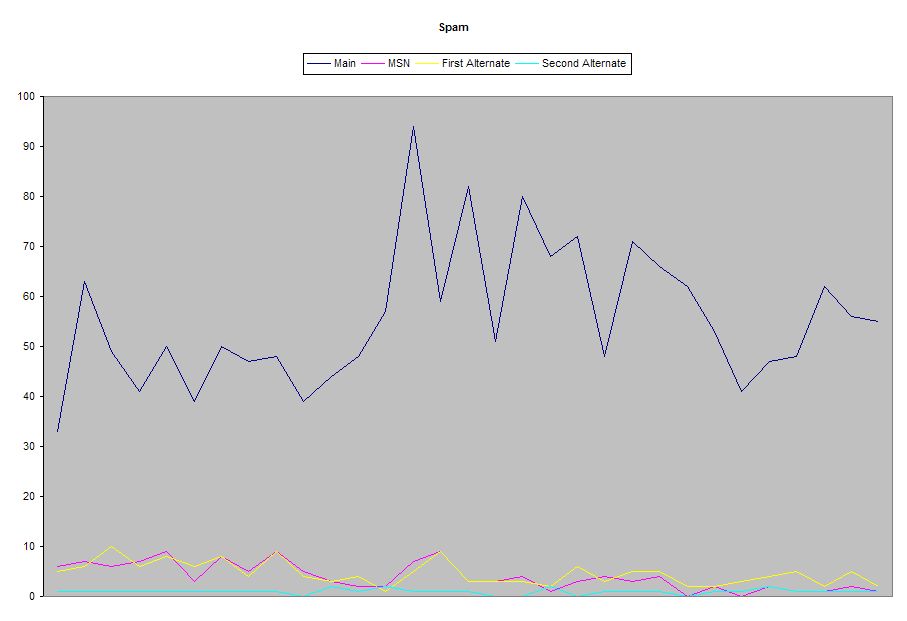
Which look like this:


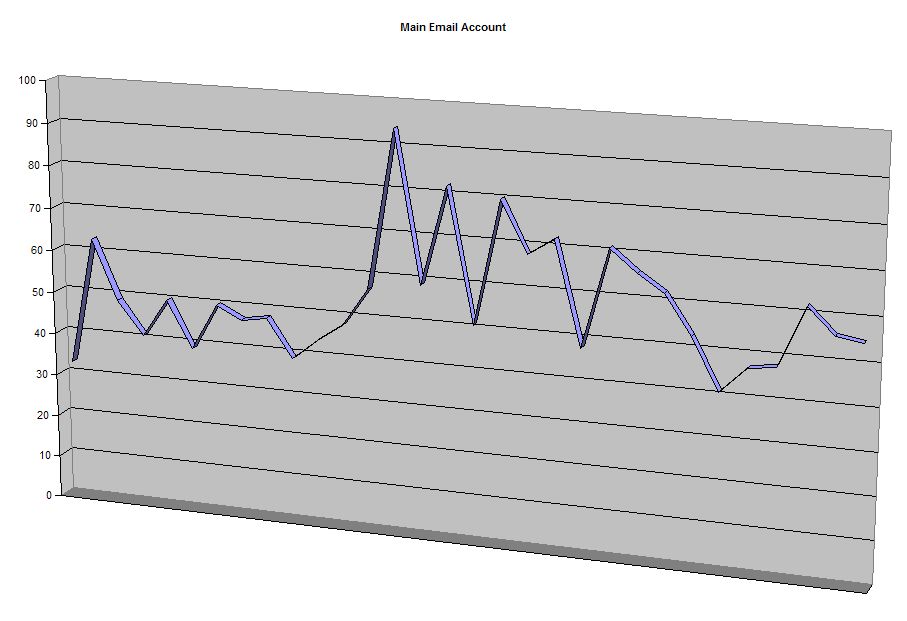
As you can see, my main account gets a lot more spam than the other accounts. It kind of throws off the graph, so here it is by itself:


And the other accounts:


So what does all of this prove? Well, not much.

One of the things I was wondering about was whether the different accounts would all spike at the same time, or whether it would be random—in other words, if I suddenly get a surge in spam in one account, will the other accounts also get a surge? But the numbers don’t seem to show that. It looks pretty random. Notice that the biggest spike for my main account was on the 14th, when I got 94 spams, which was a pretty average day for the other accounts, but then the next day it dropped down to 59, while two of the other accounts surged a bit.

Since I didn’t discern any noticeable patterns, I doubt I’ll bother recording my spam numbers going forward. But don’t breathe a sigh of relief yet—I’m sure I’ll find some other meaningless aspect of my life to track in Excel!

I’m back—didja miss me?

I got my laptop re-imaged, so I’m back up and running pretty much 100%. Unfortunately, I don’t have a sequel for The Day the Laptop Died, because… well, because nothing exciting really happened after that. Sequels are often boring, but this would be even worse:

  • The Day the Laptop Died 2:
  • Electric Boogaloo
  • Written By
  • sernaferna
  • Based on a True Story
  • int. serna’s home
  • SERNA sits at his desk. Spybreak! by Propellerheads plays as a soundtrack, over inter-cutting shots of serna backing up his data
  • ext. the car
  • serna drives to the office, with a determined look on his face
  • int. the office
  • serna
  • Here’s my laptop
  • Helpdesk Personnel
  • We’ll get it back to you soon!
  • int. the office – a few hours later
  • Helpdesk Personnel
  • Here you go!
  • serna
  • Thanks!
  • THE END

See what I mean? None too exciting. I’m not expecting The Day the Laptop Died to do that well at the box office—maybe a hundred mill, just enough to break even—but The Day the Laptop Died 2 (Electric Boogaloo) just isn’t worth making.

But enough of that.

I found out today that another person reads my blog. I’m soon going to develop a complex. It’s one thing to be an author, and have thousands of people read your book; I had editors helping me with that, and they didn’t let me make too much of an ass of myself. But it’s a weird kind of feeling to know that this blog post, that I threw off in a couple of minutes, will be read by a bunch of people. None of whom will be amused. Heh.

Oh, and for those of you who actually read the serna Bible Blog, now that I’m back up and running with my laptop, I’m sure I’ll go back to updating that regularly too.

Hmm, anything else, before I post this and go and grab a coffee? I’m thinking about picking up a laptop, while the “Back to School” sales are still going on. Staples has a really nice one, for a great price. If I do get it, I’m sure one of my first steps will be to install Ubuntu on it, and make it a dual-boot machine, so that I can keep playing with Linux.

Okay, that’s about it. More posts when I have more to write. Try and contain your enthusiasm!

Sunday, September 03, 2006

Ubuntu

Further to my earlier post, I managed to get the data off of the laptop. Here’s the thing: A colleague of mine suggested that I download Ubuntu, which is a version of Linux. It’s handy because you can burn it onto a CD-ROM, and then run it right from the CD—no need to install it.

Unfortunately, I tried it, and although I loved Ubuntu, it wasn’t able to see my NTFS drives, so I wasn’t able to get my files off using Ubuntu. Darn. So, as mentioned, I had to re-learn the xcopy command, to copy all of my files to my USB drive.

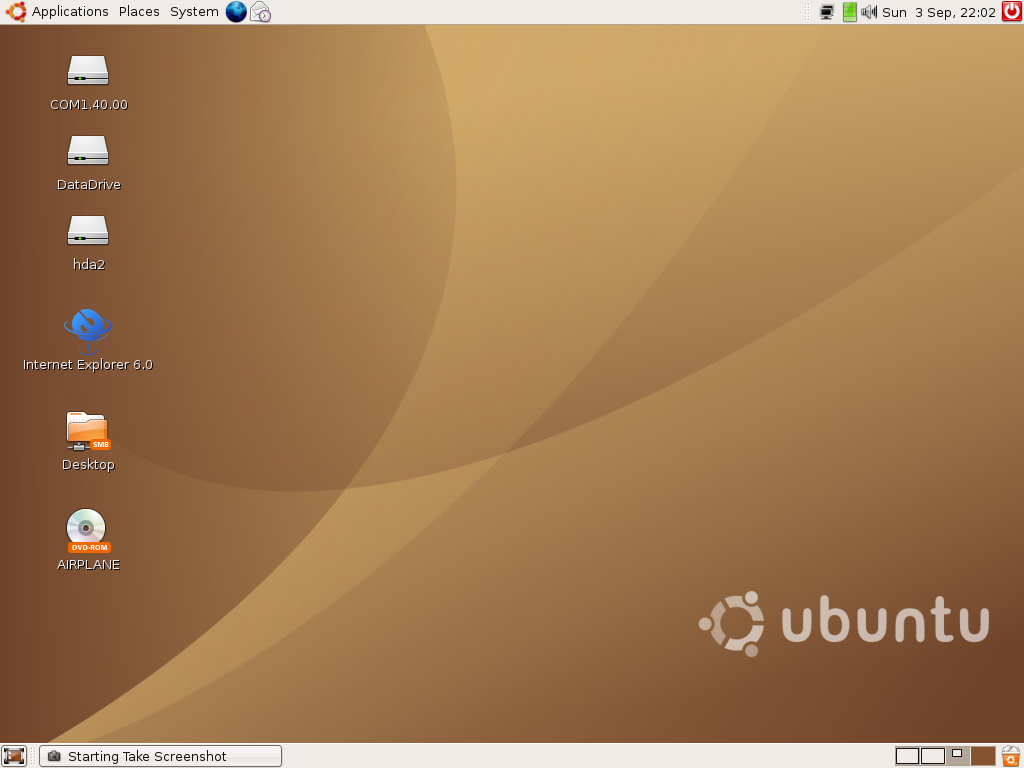
However, I should have tried harder! Since my laptop is useless anyway right now, I decided to go ahead and install Ubuntu on it, so that I’d at least have a laptop to use over the weekend. And, once it was installed, it was able to see my NTFS drives. Oh well; live and learn. (Not that i plan to do much more than surf the net, and write blog entries.) Here’s what it looks like:


Ubuntu is hailed as “Linux for human beings”, because it’s supposed to be more user-friendly than other versions of Linux. And I have to say, I definitely find it very easy to use. The operating system comes bundled with OpenOffice, an open-source office suite—word processor, spreadsheet, presentation software, and personal database—which is also, get this, compatible with Microsoft Office. So the OpenOffice word processor can read documents produced by Microsoft Word, and vice versa.

In addition, it pretty much works “out of the box”. I was surprised, when I installed it, that it recognized my wireless network card, and I didn’t have to do any configuration.

However, Linux is Linux, and every once in a while you still have to open up a terminal session, and type in some commands manually. It’s not all “point and click”. For example, I’m using HTML-Kit to write this post, which is a Windows application, running in Wine. This is what I had to type in to start it up:


And every once in a while, if you want to do something special, you’ll need to find instructions on the net on how to do it, and everyone prefers to give their instructions with terminal commands, rather than using the point-and-click interface—even if there would have been a way to do it using the point-and-click method. Which is fine—I am a nerd, after all—but it does tend to limit Ubuntu to hard-core Linux people, for the time being.

But after having used Ubuntu for a bit, I can definitely see a day in the not-too-distant future when more and more people will be giving up Microsoft Windows, and moving to something else. I’m fairly sure that I’ll start ordering computers without an operating system pretty soon—which will save me hundreds of dollars!—and just running Ubuntu, or some other variant of Linux. There are very few applications that I still need Windows for. (The big exception, of course, is that I have a Microsoft SmartPhone, which probably isn’t going to sync with anything but Windows…)

(The big question, of course, is why I haven’t tried Linux sooner, since I’m such a nerd. And the answer is that I only have one computer at home, and I don’t like messing with it—if I messed it up, I’d have no computer, until I fixed it. So having a laptop that crashes through no fault of my own gives me a great chance to try it out.)

Friday, September 01, 2006

The Day the Laptop Died

The writers at sernaferna are pleased to bring you this true story of courage, angst, and bitter, bitter defeat: The Day the Laptop Died (starring sernaferna, as sernaferna).

Please keep in mind that this is still a work in progress. Aside from sernaferna, no other actors have yet been attached to the project. (We’ve been impressed with Mr. Clooney lately, so maybe we could approach him to play “Support Guy”, but to us, he just doesn’t seem right for the part.)

  • The Day the Laptop Died
  • Written By
  • sernaferna
  • Based on a True Story
  • int. the office
  • SERNA enters, his LAPTOP bag slung carelessly over his shoulder
  • serna turns on the laptop, and logs on
  • serna
  • (under breath)
  • So many emails, so few that are worth reading...
  • serna continues working at computer
  • computer starts churning away madly—it’s doing something
  • serna
  • What the?!?
  • Oh well.
  • serna continues working
  • MS Word
  • You really should have closed Word, before you shut down Windows.
  • serna
  • But I DIDN’T shut down Win—
  • laptop reboots
  • serna
  • Oh.
  • (realizing what has happened)
  • OH! I didn’t get to save my work! Crap!
  • Windows tries to load up again, and produces blue screen
  • serna
  • Oh no.
  • serna realizes what has happened: the IT people have automatically tried updating his laptop with the latest Windows XP Service Pack, and it’s failed
  • INT. the office - throughout the day
  • serna continues trying to get the laptop up and running
  • serna
  • (tears in eyes)
  • Please work. Please work.
  • int. the office - serna is sort of running, using Safe Mode
  • Support Guy
  • (email)
  • Can you please reboot your computer, to complete the installation of XP SP2 for us? Thanks!
  • serna
  • (response email)
  • I’d LOVE to reboot the computer. Unfortunately, I get a blue screen every time I do. In fact, I haven’t been able to work all day. So if you guys could come and FIX it, that would be really appreciated. Thanks!
  • Support Guy calls serna
  • serna re-explains situation
  • Support Guy
  • Uh... I need to talk to someone. Gimme five minutes...
  • 15 minute delay
  • Support Guy
  • Okay, here’s the thing: it can’t be fixed.
  • serna
  • (surprisingly calm)
  • What?
  • Support Guy
  • Yeah, your computer wasn’t meant to be upgraded. It kind of made it on the list accidentally. It will have to be reformatted, and re-imaged.
  • Do you have somewhere that you can copy your files?
  • serna
  • No. No I don’t.
  • Support Guy
  • Oh! Um... Maybe someone on your team does?
  • It really sucks that this had to happen to you, because it’s not YOUR fault! You just accidentally ended up on our list...
  • serna
  • Yes, I realize this.
  • int. serna’s house - the next day
  • serna spends the entire day trying desperately to get his files off of his laptop, although he can’t actually boot it up properly.
  • serna re-learns the xcopy command, which he hasn’t used since college, since drag ’n drop isn’t working in Safe Mode

And that’s it. I realize it needs a better ending, but, frankly, the story is still ongoing. Perhaps there will be a sequel…

Wednesday, August 30, 2006

Working from home—Movie Day!

One of the advantages of working from home is that I can pop on a movie, and watch/listen while I work. Which is a good thing, because there were a few movies on the PVR.

One of the disadvantages is that, since I was home on my own, I only watched movies that I knew Andrea wouldn’t want to see. And, since Andrea has better taste in movies than I do, it means that I just watched crappy movies. Good thing I was only half paying attention, or I would have been annoyed with myself for wasting so much of my own time.

So here’s what I “watched”:

  • Elektra: I don’t have anything to say about this one. It was so bad I didn’t pay attention at all. No surprises there, right? It didn’t exactly get rave reviews. I turned this one off before it was finished—even though I wasn’t even properly watching it, I still couldn’t leave it on.
  • Transporter 2: Also a bad movie, but at least I was able to leave it on for the duration. (I think I’ve said this before, but I don’t mind “mindless” movies. As long as they’re somewhat entertaining. Elektra didn’t quite make the cut.) Unfortunately, I can’t say much about this one, because I didn’t pay enough attention. It has two good looking female characters, who had no part in the movie. Well, their part was that they were good looking, I guess. One of them was always shooting people, wearing nothing but a bra and panties. I guess because the director wanted to go for realism—every assassin I’ve ever met has been a good looking woman, wearing her bra and panties while she killed people.
  • Beverly Hills Cop: An oldie, but a g— um… I don’t know. This movie is definitely dated, but it still has a certain charm. It was made in 1984, and if you ever forget that, all you have to do is listen to the soundtrack. I’ll have Axel F running through my head for days.

Tuesday, August 29, 2006

Lunch

So, to add to the other fun I’m already having today…

I couldn’t decide what to have for lunch today, since I’m not hungry at all. But there was a Mr. Sub right beside the bank machine I was using, so I figured I’d get a Seafood & Crab sub. I’ve had them before, and they’re pretty good. (Not as good as the Seafood & Crab subs at Subway used to be, but Subway discontinued that sub, so it’s no longer an issue.)

So I asked for it, and the woman behind the counter got a scoop of the seafood & crab mix, and put it on the bread. It was such a little amount of food that it wasn’t even enough to cover the bread. In the past, when I’ve got that sub from them, it’s been a half inch thick; I don’t usually even get any toppings with it, except salt and pepper, and it’s enough food. But in this case, I would have simply been eating bread, with a bit of cheese and seafood flavouring.

So I told them no thanks, and walked out. And, since I am still not feeling very hungry, I’m back to the drawing board, trying to decide what to have for lunch, if anything.

The funniest thing to me is that if you go to their web site—which I’m not linking to, because I’m petty that way—the Seafood & Crab sub is listed as one of their Premium Subs!


P.S. Every single time I typed “Seafood & Crab” for this post, my fingers accidentally typed “Seafood & Crap”. I had to go back manually and correct it all. I guess I just find “crap” more natural to type than “crab”. I don’t think it was a Freudian slip, but it may be hasty to make too many assumptions, at this juncture.

Oh Blogger. You disappoint me so!

Blogger was down again today, for a while. At times my blog was probably available, although I wasn’t able to post to it, and you probably weren’t able to submit comments. Maybe at other times it wasn’t available at all, for all I know. (I keep saying “probably” and “maybe” because I was trying to get some work done, too; I wasn’t able to just keep hitting the site, and seeing if it was up yet.)

And, as is so often the case, the time that Blogger was down was the time when I actually had things to post! I wanted to respond to James’ comment, plus I had two other posts I wanted to put up. On top of that, I had an idea for updating the template, slightly.

So I did what I always do, when Blogger is down: I wrote what I wanted to write, and saved it on my desktop, until they could come back up. You may notice that the timestamp for this post is within minutes of a couple other ones.

“Anti-American!!”

Click here for an animation (Flash) with Noam Chomsky and The Dandy Warhols, by Michael Menion.

I found this from chomsky.info.

serna MAD! Grr!

I was so angry when I wrote this that my hands were shaking. Unfortunately, here are some things I can not do:

  • Tell you why I was angry—it’s work related
  • Properly take out my anger on the person who caused it—client/consultant relationship
  • Swear and scream and cuss about it—hardly befitting the blog of a guy who calls himself a Christian
  • Stop thinking about it—it’ll take a while for that to happen.
Ah, life. You take the good with the bad.

Anyway, by the time you read this, I’ll probably be over it. In fact, Blogger was having technical difficulties again today—as is so often the case—so even by the time I posted it I was calmed down a fair bit. Althought not completely.

Monday, August 28, 2006

Interesting Link

I wish I could have come up with a better title for this post, but I’m not really sure what to say.

Check out this link—you’ll need sound. Some of you may already have seen it; I got the link from Raymi’s blog, so I don’t know if it’s been going around forever, or just went up today. (I’m not exactly in touch with internet goings on…)

Movie Review: Good Night, And Good Luck

Good Night, and Good Luck is about the broadcast journalist Edward R. Murrow, and his exposure of the excesses of Joseph McCarthy, and his fight against Communism. (The movie gets its name from the tagline Murrow used to close every show.)

If you’re not familiar with Senator McCarthy—or have heard the name but don’t know what it’s all about—here’s a very brief synopsis: McCarthy was an ardent anti-Communist. He was convinced that Communism was running rampant in America, and, specifically, that Communists had infiltrated all levels of the American government. McCarthy believed that America was becoming weak, and he believed that it was because the Communists were bringing America down from within. Here is an excerpt from an article in The Nation, in which Jonathan Schell gives some background:

Perhaps a clue can be found in the famous speech that Senator Joseph McCarthy gave in Wheeling, West Virginia, in February 1950. This was the occasion on which he announced his specious list of Communists in the State Department, launching what soon was called McCarthyism. He also shared some thoughts on America’s place in the world. The allied victory in World War II had occurred only five years before. No nation approached the United States in wealth, power or global influence. Yet McCarthy’s words were a dirge for lost American greatness. He said, “At war’s end we were physically the strongest nation on earth and, at least potentially, the most powerful intellectually and morally. Ours could have been the honor of being a beacon in the desert of destruction, a shining living proof that civilization was not yet ready to destroy itself. Unfortunately, we have failed miserably and tragically to arise to the opportunity.” On the contrary, McCarthy strikingly added, “we find ourselves in a position of impotency.”

By what actions had the United States thrown away greatness? McCarthy blamed not mighty forces without but traitors within, to whom he assigned an almost magical power to sap the strength of the country. America’s putative decline occurred “not because our only powerful potential enemy has sent men to invade our shores, but rather because of the traitorous actions of those who have been treated so well by this nation.” And, he raved on in a later speech, “we believe that men high in this Government are concerting to deliver us to disaster. This must be the product of a great conspiracy, a conspiracy on a scale so immense as to dwarf any previous such venture in the history of man. A conspiracy of infamy so black that, when it is finally exposed, its principals shall be forever deserving of the maledictions of all honest men.”

(The article isn’t about McCarthy or McCarthyism, but I thought this passage was relevant.)

McCarthy’s solution to the problem was to hold government hearings on “un-American activities”, in which he “exposed” people he thought were Communists. In addition to rooting out Communism in government, McCarthy also “exposed” many in Hollywood and the entertainment industry as Communists. Unfortunately, McCarthy often accused people of Communism with little or no evidence, and when people were exposed, it stuck. Many people had reputations and careers ruined, because of McCarthy’s baseless accusations. (There is a very poignant example of this type of baseless accusation in the film.)

Because of his ardent, and excessive, personal quest to expose communism and communists in the United States in the 50s, the very name “McCarthy” has become synonymous with modern-day witch hunts, so I suppose Clooney thought it was appropriate to reexamine this time in America’s history, now that so many are bringing the search for terrorists to McCarthy-ist levels.

I say “Clooney thought it was appropriate”, because, in addition to starring in the movie (although not in the main role), Clooney also directed, and, I think, was one of the main drivers behind the movie. And, in my opinion, he did a fine job. The movie is filmed in black and white, and it was done that way for a reason: There is no actor, in the movie, playing McCarthy. Any time McCarthy appears, it is only in footage of the real McCarthy, from the original hearings. (As well as the actual footage from Murrow’s show, when McCarthy came on to defend himself against Murrow’s accusations.)

In addition to the practical reasons, however, shooting the film in black and white gave it a real beauty. Cinematically, the movie is excellent. Whoever did the camera work did an excellent job.

I did have a couple of problems with the movie, but they were minor. There were a couple of aspects of the story that felt a bit unresolved; if I were to guess, I would say that the movie had to be edited down, for time, and the resolution of those plot points ended up on the cutting room floor. Unfortunately, the net result is that those parts of the plot don’t end up adding anything to the movie, and simply form a distraction from the main story.

Good Night, And Good Luck is a great movie, and I recommend it. I don’t think it did well at the box office, unfortunately, but it did get great reviews. (I’m not overly familiar with the Rotten Tomatoes site, but if I’m reading it correctly, the movie got good reviews both from critics and from Users.)

Sunday, August 27, 2006

The Attic

I had been planning to run some network cables from my bedroom—where the only upstairs cable outlet is—to my office. The plan was to keep the cable modem in the bedroom, since it has to be, but to put the network router in the office, and reduce some of the clutter in the bedroom. (Not to mention all of the blinking green LEDs, that brighten up the room when we’re trying to sleep!)

Unfortunately, I took a look into the attic, and I saw this:


Now, I was expecting there to be some insulation. But I wasn’t expecting a 1- or 2-foot-deep sea of it, as far as the eye can see! I can’t even tell if there are places to walk; I tried digging around in the stuff in a few places, to see if there was a sturdy place to put my feet, but couldn’t find anyplace.

So my plans for attic wiring are temporarily on hold, until I can educate myself on the best way to proceed.

Friday, August 25, 2006

No Silver Bullet

Warning: Heavy geek content. If you’re not a developer, you probably won’t find this too interesting.

A friend of mine sent me some articles on Knowledge Management, including an article called No Silver Bullet: Essence and Accidents of Software Engineering, by Frederick P. Brooks, Jr., an article that argues that “there will be no more technologies or practices that will serve as ‘silver bullets’ and create a 10-fold improvement in programmer productivity over 10 years” (to quote the Wikipedia article, which can be found here).

In the article, Mr. Brooks breaks software complexity into two categories: accidental complexity, and essential complexity. Accidental complexity is unrelated to the problem the programmer is trying to solve; this complexity comes from the realities of dealing with a computer; things like “bits” and “bytes” and “registers”. Essential complexity, on the other hand, is the complexity that comes with trying to solve real-world problems. The article makes the case that better tools—good Interactive Development Environments (IDEs), faster workstations with more memory, good tool libraries, etc.—have solved the problems involved in accidental complexity, whereas tools cannot solve essential complexity. Furthermore, although better tools will make incremental jumps in productivity, in relation to the accidental complexities being further reduced, there will be no more order of magnitude jumps in productivity.

In other words, the article did a good job of articulating some things that all programmers instinctively know: you can improve and improve and improve the tools that are available to developers, but the truth is, the real complexity in software is something that tools can’t solve. The real complexity comes from the business requirements that the software is trying to implement—which are always a moving target—and from the nature of requirements gathering, which is an imperfect science, no matter how good we try to get at it.

The author argues that moving from assembly programming to higher-level programming languages was an improvement that was an order of magnitude:

High-level languages. Surely the most powerful stroke for software productivity, reliability, and simplicity has been the progressive use of high-level languages for programming. Most observers credit that development with at least a factor of five in productivity, and with concomitant gains in reliability, simplicity, and comprehensibility.

What does a high-level language accomplish? It frees a program from much of its accidental complexity. An abstract program consists of conceptual constructs: operations, data types, sequences, and communication. The concrete machine program is concerned with bits, registers, conditions, branches, channels, disks, and such. To the extent that the high-level language embodies the constructs one wants in the abstract program and avoids all lower ones, it eliminates a whole level of complexity that was never inherent in the program at all.

However, he continues:

The most a high-level language can do is to furnish all the constructs that the programmer imagines in the abstract program. To be sure, the level of our thinking about data structures, data types, and operations is steadily rising, but at an ever decreasing rate. And language development approaches closer and closer to the sophistication of users.

Moreover, at some point the elaboration of a high-level language creates a tool-mastery burden that increases, not reduces, the intellectual task of the user who rarely uses the esoteric constructs.

There were times, as I was reading the article, when I was shaking my head, and not agreeing with Mr. Brooks. However, these were all areas in which he predicted the way software development would evolve, and things didn’t turn out quite that way. (For example, he discounted the benefit of improving the memory and processing power available on developers’ workstations; he argued that the machines were already so fast that it was getting to the point where the human was never waiting for the machine, and the power was not being utilized. But it turns out that the incredible leaps in processing power and memory that are now available have made possible great advances in IDEs—such as auto-completion—which require the tool to keep a lot of data in memory, to be immediately available to the developer.) But considering that the article was written in 1986, it’s not surprising at all that certain assumptions about how software development would evolve turned out to be incorrect, so any time he wasn’t quite right, there was no way to fault him for it. And, frankly, anything that I did disagree with was trivial; his main points are completely valid. (Using the memory example, even things like auto-complete are still just incremental gains in reducing accidental complexity. And there are those who would even argue that it’s harmful; I love that article, even if I don’t completely agree with all of it.)

To be clear, as tools evolve, they are making developers more productive, and Mr. Brooks doesn’t claim that they aren’t. (And he’s not against tools, nor the productivity that they add!) His argument is in scale, not absolutes; the tools will make people more productive, but the leaps in productivity will be incremental, not 5-fold leaps, like the introduction of higher-level languages, from assembly. And there is no denying that the tools are getting better and better; to see how much time you can save with an IDE like WebLogic Workshop or Eclipse, for J2EE development, you’d be a fool not to use these types of tools. (Mr. Brooks also touches on Artificial Intelligence (AI) in the article, and I would argue that the tools are getting better at becoming expert systems. If the developer wants to perform a common task, the IDE can probably generate a good portion of the code, and do it using best practices to boot.) But, again, these improvements are all to reduce accidental complexity, while the developers—and business analysts and systems analysts and project managers—are still left to figure out the essential complexity, of solving the business problem at hand.

In fact, I would argue that, since the tools have done such a good job reducing or eliminating accidental complexity, that developers have gotten more productive, and business users/clients/customers have gotten used to software being delivered faster and more reliably—and have therefore started to demand ever increasingly complex software!

I’ll end with another good quote from the article:

Conformity. Software people are not alone in facing complexity. Physics deals with terribly complex objects even at the “fundamental” particle level. The physicist labors on, however, in a firm faith that there are unifying principles to be found, whether in quarks or in unifiedfield theories. Einstein argued that there must be simplified explanations of nature, because God is not capricious or arbitrary.

No such faith comforts the software engineer. Much of the complexity that he must master is arbitrary complexity, forced without rhyme or reason by the many human institutions and systems to which his interfaces must conform. These differ from interface to interface, and from time to time, not because of necessity but only because they were designed by different people, rather than by God.

The lesson to take from this article is nothing new; it just re-emphasizes the fact that software development is complex, and developers and designers need to be aware of that. Having a good design—and archiecture—before you begin coding is essential, as is understanding the business requirements before you start designing. Building software iteratively will always win over the “waterfall” approach, because the needs of the users are constantly evolving, and constantly being clarified.

MAD TV

Does anyone still watch MAD TV? No? It was funny years and years ago when it first started, and then got boring, so now you don’t bother to watch it anymore? Yeah, that’s what I thought. I’m glad we’re on the same page.

Anyway, I was looking around on YouTube for a clip from a MAD TV sketch, that I could put here. It was this male/female duet, who sang a song called You Are the Light of My Life. I don’t remember it exactly, but the words went something like this:

You are the light of my life

key change

You are the light of my life

key change

You are the life of my light
You are the light of my light
You are the life of my life

etc. etc.

I found it extremely funny—as did Andrea, who has also seen it—and every once in a while one or the other of us will start mockingly singing it, and we’ll both have a lot of fun, and a good time will be had by all. Unfortunately, I couldn’t find it. I found some other clips, featuring the same duet—including a really bad quality one—but not the original one.

Oh well. At least I’ve done my duty, and posted something to my blog today. It might not have been what I had planned to post, but something is better than nothing, right?

Thursday, August 24, 2006

His tummy gurgles, as he lovingly crafts his Blogger post

I mean stomach! Guts! Crap factory!

For various reasons that I can’t go into, I really feel like blogging right now. Unfortunately, as is often the case, I have nothing to say. No pictures of Post-It®-covered desks, or interesting factual tidbits from my life. No book reviews or movie reviews. Especially no movie reviews, because I haven’t seen a movie in a while. (We have The Constant Gardener ready to go in our PVR, but haven’t had time to watch it yet. Not to mention two or three movies I recorded that I know Andrea won’t want to watch, like Beverly Hills Cop, and Transporter 2.)

I came across a bunch of interesting web sites today, most of which I can’t post here. (They’re not dirty or anything, just not appropriate for this blog.) I can post this one, though, which has a bunch of videos answering Stephen Colbert’s Green Screen Challenge.

If I may indulge in some self congratulation, I must say that I prefer my blog layout to many other peoples’. Not all other blogs, by any means; there are a lot of very creative people out there, who have done a fantastic job laying out their blogs. But there are also a lot of other people out there who have put together really badly designed blogs, and I think they outnumber the people who did a good job. (Not including, of course, the people who simply took default templates from Blogger or LiveJournal or whatever blogging site they use. Of course, even some of the standard templates are pretty ugly.)

I find my layout (and fonts) easier to read than a lot of the other ones out there. It’s not, I know, very artistic. Just very functional—which was what I was going for when I put it together. Many of my readers may find it boring, which I can’t blame them for. But it does put the focus on the words, rather than the background image, and million links to other blogs, and fancy flashing banner graphic, and myriad other things that other bloggers put on their blogs. When you come here, you don’t have to search around to figure out what you’re supposed to read; I think it’s pretty self-evident. (It also loads faster than a lot of blogs out there, since it’s mostly text.)

For lunch today, I had probably the unhealthiest collection of food I’ve consumed in a long time. I hope we have something decent for supper tonight, or my body is going to hate me more than it already does. On the plus side, though, I haven’t done too badly with my morning exercise. I haven’t been out every morning—and I took the week off when I was on vacation—but for the most part, I’m doing okay.

The drawback, however, is that I’m going out early enough that I’m noticing that the sun is just starting to come up—whereas a couple of weeks ago, at the same time, it would have been up already. Similarly, I went out at 8:30PM this week, and it was already starting to get dark, whereas it would have been nice and bright at that time, a couple of weeks ago. All this adds up to one thing: The days are getting shorter, which means the warmer weather is getting ready to depart. Which makes me sad.

Soon we’ll have to start dressing warmer. The warmer months are almost gone, and not once have I sat out on my front porch, with a beer, reading a book and enjoying the weather. Okay, to be fair, that’s not something I’d be likely to do anyway. Probably a bad example. But in any event, I don’t feel that I’ve enjoyed the warmer months as much as I could have. But I guess my mourning is premature; August isn’t even done yet, so I still have some time to enjoy the fleeting warmth Toronto has to offer.

But soon Construction Season will be over, and Winter will be upon us again. Warm months, do not go gentle into that good night! Rage, rage against the dying of the… um… warmth.

Oh, and one last thing: I used the phrase “of course” four times in this blog entry. And I call myself a writer! I need to enlarge my vocabulary.

Wednesday, August 23, 2006

serna’s nerdiness

Have I mentioned that I’m a nerd? Why yes I have. Here’s more proof:

I find myself, on a regular basis, turning my screensaver off or on. For example, if I am on a conference call, I’ll turn it off, because I may very well be sitting in front of the computer for more than 5 minutes without doing anything, but I don’t want the screensaver to come on while I’m there. And then, when I get off the call, I promptly turn it back on again.

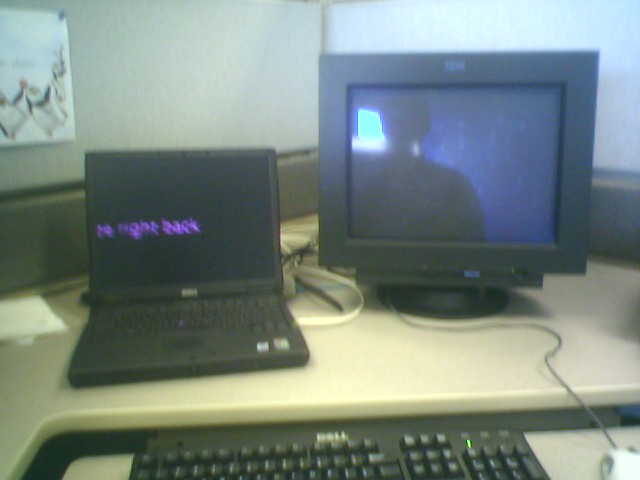
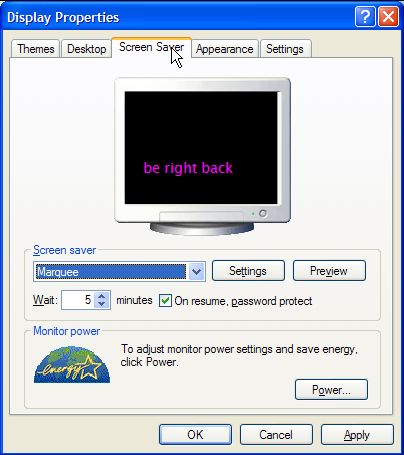
Or sometimes, when I’m stepping away from the computer just for a minute, I might throw in the Marquee screensaver, with a message that says “Be right back!”


I got this idea from a previous job, when I was working at a help desk where we were always repairing computers. Sometimes one of us would use the Marquee screensaver with a message saying something along the lines of “This computer is downloading software; please don’t touch”. It was a handy way to make sure none of us messed up work the others were doing.

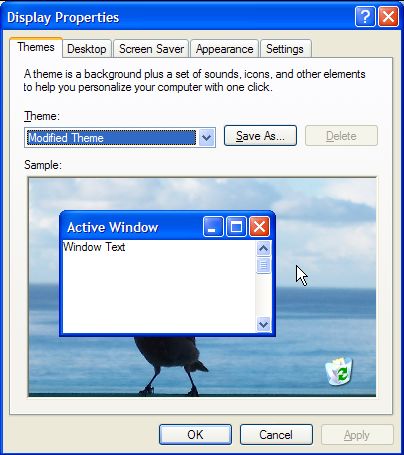
But changing the screensaver is a bit cumbersome. You have to open up the Display Settings—which doesn’t usually come up immediately—go to the Screen Saver tab, and make your selections, and then choose OK—which also doesn’t usually happen immediately.


So what does that have to do with nerdiness? The answer is this: I’ve created VBScript batch files, that can programatically make all of the changes to my screensaver settings at the click of a button. (One to turn off the screensaver, and another to turn it on, set it to time out after 5 minutes, and be password-protected.) So if I’m doing something at my desk, but not necessarily with the computer itself, boom, click the button to disable the screensaver, and work away. When I’m stepping away, bam, click the button to turn it back on, and the computer will be screen-saved.

I’ve discovered one problem, though: If you want to change the timeout value—how long Windows will wait before turning on the screensaver—you can’t do it programmatically. Well, you can, but the changes don’t take effect until you reboot, which defeats the purpose. (If you change that setting using the Display Settings dialog, it takes effect immediately, of course.) The only reason that’s a problem is that I like to set the timeout for my Marquee screensaver to 1 minute, and my regular screensaver to 5.

Tuesday, August 22, 2006

Wow

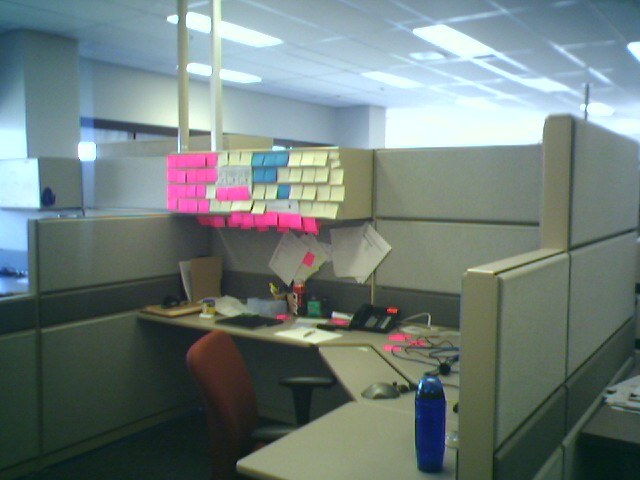
I was walking through the office the other day, and I noticed the following:


In case the picture isn’t clear enough, those are Post-It® Notes. I have multiple theories as to what might be happening here:

  1. The person in question is über-organized, to the point of anal retentiveness.
  2. The person in question is completely lacking in organization, and resorting to Post-It® Notes out of desperation
  3. It might have nothing to do with organization; maybe the person is just feeling creative.
  4. The person hates trees, and is trying to destroy the planet as fast as possible. Or the person is committing suicide by really, really, really slow means, by destroying the Earth.
  5. Someone played a prank on the person in question, and just didn’t go far enough.
Incidentally, if you have $20 to throw away, you can buy Post-It® Digital Notes from 3M. If you use Post-Its® a lot, you might find you waste less paper that way. (Note: I haven’t tried the software, so if it’s crap, don’t come crying to me. I won’t care. They have a 30-day trial version; download that, before you shell out the big bucks for the real one. Come on, people, use your heads! Do I have to think of everything for you?)